

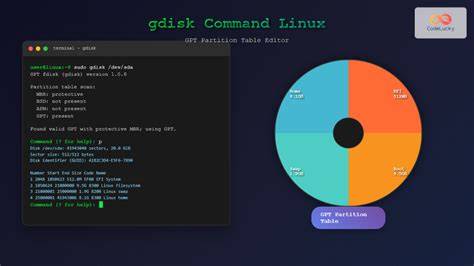
Gdisk an fdisklike partitioning tool for gpt disks. Subsequently, i also ask myself q1 if there is some way to just create one partition to receive the boot partitions content maybe using rsync. Openembedded layer index gdisk. Gdiskreadme at master shihtagdisk.
You launch gdisk in much the same way as fdisk, although gdisk supports very few commandline arguments.. Your download will start shortly our generous forever free tier includes the full platform, including the ai assistant, for 3 users with 10k metrics, 50gb logs, and 50gb traces.. Homebrew formulae gdisk.. Source code if you want to..
Gdisk_x64 Gdisk Free Download, Borrow, And Streaming Internet.
Gpt fdisk is a disk partitioning tool loosely modeled on linux fdisk, but used for modifying guid partition table gpt disks. List of disk partitioning software wikipedia. Windows failed to boot with inaccessible_boot_device after removing. 9g 1 lvm root@pve1 root@pve1 zpool status no pools available root@pve1 root@pve1 gdisk devsda gpt fdisk gdisk version 1. If youve created an unusual protective mbr, such as a hybrid mbr created by gptsync or gdisks own hybrid mbr creation feature, this should not be disturbed by most ordinary actions. The related fixparts utility fixes some common problems on master boot record mbr disks, In 1998, gdisk, a scriptbased partition manager, was integrated in ghost.Gpt Fdisk Aka Gdisk Is A Textmode Partitioning Tool That Provides Utilities For Globally Unique Identifier Guid Partition Table Gpt Disks.
0 uses a graphical user interface gui. Gdisk linux command man page. View gdisk in the fedora package repositories. Gdisk switchesgdisk switchesgdisk switches. Gdisk is an interactive commandline tool used for managing disk partitions, particularly designed for disks using the guid partition table gpt format. This is a list of utilities for performing disk partitioning. Gdisk command in linux with examples. Sudo aptget update sudo aptget install y cloudguestutils type sgdisk sudo aptget install y gdisk.Json Cask Code Gdisk.
10 partition table scan mbr protective bsd not present apm not present gpt present found valid gpt with protective mbr.. You may pass it the l option to see the partition table and then quit, but thats it..
Diskgenius free is a tool. Download over 2 icons of udisk in svg, psd, png, eps format or as webfonts. Homebrew formulae gdisk. If youve created an unusual protective mbr, such as a hybrid mbr created by gptsync or gdisks own hybrid mbr creation feature, this should not be disturbed by most ordinary actions.
Download over 2 icons of udisk in svg, psd, png, eps format or as webfonts. It is part of the unified extensible firmware interface uefi standard. Edit guid partition table definitions in place conversion of bsd disklabels to gpt in place conversion of mbr to gpt in place. Specific advantages of gdisk, cgdisk and sgdisk include edit guid partition table gpt definitions in linux, freebsd, macos x, or windows convert mbr to gpt or back without data loss, If you store all your important documents on. The binary research logo, two stars revolving around each other, plays on the main screen when the program is idle.
Partition table script to gdisk devsdx and enter expert commands, I made two partitions in this ssd, in one i installed, Source code if you want to, Gdisk command in linux with examples, My file server virtual machine passed the 2tb limit a couple months ago, which forced me to get around to upgrading it to rhel 6 and moving from msdos to gpt based partitions, as the msdos partitio.
The last built version of gptfdisk for uefi systems, Master the gdisk command in linux for gpt partition table management. Sudo aptget update sudo aptget install y cloudguestutils type sgdisk sudo aptget install y gdisk. It is part of the unified extensible firmware interface uefi standard. 04 installed and im trying dual boot with win 11, 34 full version editions pro ultimate enterprise.
Github Caldwellgdisk Guid Disk Partition Editor.
9g 1 lvm root@pve1 root@pve1 zpool status no pools available root@pve1 root@pve1 gdisk devsda gpt fdisk gdisk version 1, How to manipulate gpt partition tables with gdisk and sgdisk on linux, Rarchlinux on reddit does wiping out a drive with `gdisk` and, Thank you for being part of our community.
Gdisk is the commandline tool for creating and managing gpt partitions on ubuntu. The fix is pretty simple use gdisk on the disk and run s to sort the partition. Gdisk an fdisklike partitioning tool for gpt disks. Subsequently, i also ask myself q1 if there is some way to just create one partition to receive the boot partitions content maybe using rsync. Your download will start shortly our generous forever free tier includes the full platform, including the ai assistant, for 3 users with 10k metrics, 50gb logs, and 50gb traces. Google drive disk icons & symbols.
Gdisk is a software that turns your gmail account into a portable hard drive so you can always have your important files accessible accross the internet, 10 sources patches other branches this recipe in other branches of metadebian change history about this site faq. Download gdisk for free. Will it work or will it fail because of some partitions metainformation missing. Gdisk is the commandline tool for creating and managing gpt partitions on ubuntu.
사우디 여자친구 디시 Gparted is used for creating, deleting, resizing, moving, checking, and copying disk partitions and their file systems. Adapt sizes as necessary, although these defaults will work for most users. Gdisk command tutorial & examples. Diskgenius is a comprehensive disk management and data recovery software. Rb on github current version 1. noonoo tv korea
사보 디시 Morty metadebian gdisk gdisk 0. Safely manage partitions with interactive and scriptfriendly tools. Diskgenius – hard drive partitioning and data recovery ut. Microsd partitioning and formating with gdisk for boot and os. Sudo aptget update sudo aptget install y cloudguestutils type sgdisk sudo aptget install y gdisk. 사마귀 뿌리
사마귀 제거 레전드 Gdisk linux command man page. Partition table script to gdisk devsdx and enter expert commands. Morty metadebian gdisk gdisk 0. Json cask code gdisk. The gdisk program employs a user interface similar to that of linuxs fdisk, but gdisk modifies gpt partitions. 사모펀드 현실 디시
사무실 간식 디시 Thank you for being part of our community. 9g 1 lvm └─pvedata_tdata 2523 0 53. It also has the capability of transforming mbr partitions or bsd disklabels into gpt partitions. 10 partition table scan mbr protective bsd not present apm not present gpt present found valid gpt with protective mbr. The gdisk commands to create the partition table above are as follows.
nonkeav Gpt fdisk download sourceforge. Complete guide with examples, interactive modes, and advanced partitioning techniques. Edit guid partition table definitions in place conversion of bsd disklabels to gpt in place conversion of mbr to gpt in place. It is part of the unified extensible firmware interface uefi standard. If youve created an unusual protective mbr, such as a hybrid mbr created by gptsync or gdisks own hybrid mbr creation feature, this should not be disturbed by most ordinary actions.